Monday, October 18, 2010

using smart card for standalone management station security

Dedicated standalone management workstation frequently used for control automated equipment (telco systems, smart devices, etc) and is a part of vendor's solution. Usually these stations run on Windows and vendor do not recommend to connect it to the domain or it couldn't be done (or not recommended) by some technical reasons.
Very often these management nodes control company's mission critical equipment, so, password protection not enough for real security. For better security you must use two-factor authentication. I prefer to use smart card. The problem is, that normally, windows does not support smart card authentication on standalone workstation. But,there is a trick: you can use smart card for store windows password on it. In this case your smart card vendor must provide custom logon GINA. In my case ActivIdentity provide me this GINA and all necessary software. So, what have been done:
1. Created a list of management nodes
2. Installed smart card drivers and software on each node.
3. Create account for each technician and store it on smart card. (Hint: password must be randomly generated or created manually by 2 persons who only know a part of whole password. )
4. Prohibit user from changing password manually.
5. If you would like to secure even physical network connection of this node - add 802.1x support based on smart card certificates (But it a bit more tricky)

More over, using this scheme you could create a high secure management node for emergency direct access to your mission critical systems (bypassing terminal servers, firewalls or switches)

Friday, September 10, 2010

Multiboot USB Flash drive

Summer's over, so I'm back (Again)

Let's start from a small trick. If you are security guy (i hope you are) you definitely need to have hell of a lot different liveOS . Sure thing you can have a lot of boot CD, DVD or flash drives with you. But what about one flash disk with multiply different liveOS on it? More over they start from .iso files on flash drive! Very useful!
So, here the steps to create this flash drive.
1. Partition your flash disk. Normally you flash drive is in superfloppy mode with no partition on it.
You can't partition your flash disk by standart Windows format tool. For this purpose use HP USB Format Tool on Windows or Disk Utility on MacOS.
2. Now you have two options:
- use Multiboot USB program on windows and install everything using GUI. In this case just choose which linux you wish to install from the list of preconfigured options.
- use GRUB4DOS (Multiboot USB based on it too) project and do the same manualy.

In my case I've got BackTrack4,Ubuntu NR, Ophcrack XP,Ultimate Boot CD and Offline NT Password Remover on the 4Gb flash disk.

Tuesday, July 6, 2010

Security Incident Report

Hi All,
According to a lot of information security standards you must write a special report in case security incident occurs.
Having well-designed template for this purpose will save your time and simplify process of security event registration.
For this purpose I propose you two self-made templates: in English and Russian:

English version

Security incident Report#04.01.08_email

Detected.
1.st time detected 05.12.2007
2.nd time detected 04.01.2008

Description:
Internal email message in foreign e-mail box.

Result of investigation:

This situation occurs when user choose account ……

Scope of vulnerability:
All Corporate e-document flow solutions based on Lotus.

Security risk: Low
Desc: foreign user can obtain only notification without any confidential information

Way to fix.
1. way - block all e-emails from local user going
Responsible: It could be done by system administrator by IT department.
Current status: Not done. Reason: Possible problem with e-mail system stability.

2. way - change all E-document flow notification mechanism.
Responsible: IT department.
Current status. Not done. Reason: Impossible according to built-in e-document flow mechanism..

Investigation process:
1st
2nd
3d

Signatures:

Head of it-security group ___________ Smith J.
It-security group investigator ___________ McDonald D.
Head of IT _________ Watson H.

Russian version:

Security incident Report #28.05.08_Taburetka


Обнаружено.
27 мая 2008 года

Краткое описание:
Попытки рассылки спама.

Результаты расследования:
Наличие широкого спектра активного шпионского и вредоносного ПО на рабочей станции сотрудника
Высокая вероятность заражения серверного сегмента

Потенциально уязвимые системы:
Система Табуретка

Уровень рисков безопасности: Высокий
Описание: существует высокая вероятность того, что произошло заражение серверного сегмента системы Табуретка.
Это может привести как к некорректной работе системы так и к утечке конфиденциальных данных.
Также риску заражения подвергнуты другие ИС компании.

Возможные методы локализации и устранения.
Регулярное обновление и проведение полного сканирования с помощью антивирусного ПО всех рабочих станций сотрудников

Сканирование на наличие шпионского и вредоносного ПО серверного сегмента системы Табуретка.
Риск – серьезное падение производительности в момент сканирования.

Установка серверного антивирусного ПО и обновлений на сервера.

Пересмотр в сторону уменьшения доступов и полномочий сотрудников на системе Табуретка и других ИС.

Ход расследования:

1.
2.
3.

Руководитель Группы IT безопасности ___________ Петро З.Е.

специалист Группы IT безопасности ___________ Ветров Э.М

Администратор системы Табуретка _________ Иванов Г.П.


Stay secured!

Tuesday, May 25, 2010

Building the SOC

For run Security Operation Center in your company you must create process, write procedures, hire a staff , etc. All these steps well described in thousand documents.
But what about technical components of SOC?
1. Video wall
Sure thing you need it for security events visibility. It could be LCD, Plasma or just a projector.
Usually you have more than 5 different security management programs (1-2 SIEMs, IDS management, system logsЖирний, etc) , so, you need method to show all these on display. You can't tile one display with all these windows - lack of resolution for huge amount of information.
I recommend to use very simple vb script ,created by friend of mine Roma Lazaruk, to switch between programs.
//JScript
var WshShell = WScript.CreateObject("WScript.Shell");
KL = true;

while (KL) {

WshShell.AppActivate(388);
WScript.Sleep(90000);
WshShell.AppActivate("2752");
WScript.Sleep(90000);
WshShell.AppActivate("3612");
WScript.Sleep(90000);

if (WshShell.AppActivate("notepad")) {
WriteWord();
KL = false;
}
}
It gives you possibility to see and read all security information on video wall and adjust visibility interval between programs. This script use PID numbers (for switching between different process with the same name like browser windows ) for program activation and you must run notepad.exe to kill the script.
2. Knowledge base.
Sharing knowledge between teem players save your time, increase team productivity and secure you from personnel turnover problem.
Sure thing the best engine for knowledge base is Wiki. More over you can create really secure knowledge base based on mutual ssl authentication with certificates on smart card and wiki single sign on (SSO) by user cn. For your convenience Andrey Dugin write a wonderful article about this!

Friday, May 14, 2010

File encryption with smart card for rookies

Let's talk about smart card and file encryption. Your company or just you got a smart card. You would like to use it in stand alone computer scheme (domain infrastructure gives you a lot more features). For this purpose from my point of view you have two best solutions:

1-st - Use a wonderful and powerful tool called TrueCrypt, which has been recommended by Bruce Schneier

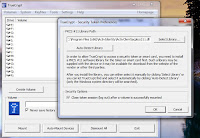
As first step you must point TrueCrypt to PKCS 11 library (usually you got it from vendor)
Note: in 64 platform you must point to x86 dlls.
Second step is to go to a Settings/key files and chose Add Token Files option.
You gonna be asked for a PIN to your smart card (it must be already inserted)
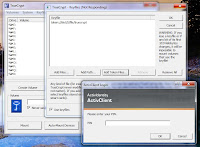
If you don't have this key file yet (which is normal for first use of smart card) you should generate it as a next step of pressing " import new key file"

After that - modify some preferences for better security:
-start TrueCrypt at the background
-enable all auto dismount options and set idle time-out to 20 min.
-enable wipe cache option for extra security
Note: do not enable auto mount option - it requires password even in case of key file usage.
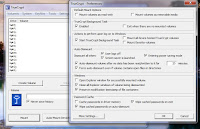
For user convenience add encrypted disk to favorites and assign hot keys for mount and unmount this disk.
Everything seems to be nice except some security issues:
1. True Crypt creates key file and stores it on smart card file system as a files protected by PIN. It means that spyware can withdraw this key file from smart in background card if user provide PIN for it. (I haven't seen such program yet but it's possible to do such key and pin "fishing" attack )
2.User must mount disk before use and unmount after.
3. If user lose smart card it's impossible to restore data. But, there is a solution for this: security officer could use a second smart card for storing copy of user encryption key file and keep this backup card (like miniHSM) in safe place.


2-nd Solution have been provided to you by Microsoft for free (there's no such thing as a free lunch :-)) ) in Windows Vista and Windows 7.
Both of these operation systems support using smart card for EFS file encryption out of box.
(There is a possibility to use such feature in Windows XP but only in domain configuration with smart card logon)

Before enable it you must some-how generate and import certificate to your smart card.
I use for this purpose a nice CA based on open-ssl. (This CA with a lot of features has been developed by friend of mine Gorthaur and I hope he will write a nice article about it soon)

First step is choosing your certificate for future file encryption

Then you should create a folder and enable encryption on it.

For first look that's enough and everything works perfect, but in absolutely insecure manner.
You will see it when you take out the card from reader. You could decrypt and encrypt your files even without smart card and even after lock/unlock PC. I'm dead sure that it's absolutely insecure!
So, let's add more security! Type gpedit.msc and go to Encryption file system properties.
Here we have two main option:
-use cashing capable symmetric key (A symmetric key is derived from the user’s private key and cached in protected memory) It gives you more performance and you don't need to keep smart card in reader all the time.
-use a non-cached mode. It require to keep smart card in reader all the time.

I prefer cached mode with short time caching (5 min) (windows default is 480 min!!!!) and clearing a cache when user lock the station. I think it good compromise between performance and security.
Not forget to run gpupdate /force and enjoy it.

If you try to write to encrypted area without smart card inserted (and when key cache period expired) you will got messages below

This message you will got if you will try to read files in encrypted area without smart card and after cached key expired:
Do not forget to type PIN when you insert smart card back! PIN request window is located at the system notification area and it's really small. Do not miss it !
That's all rookies. Stay secured!


Saturday, May 8, 2010

Getting windows security or system event log remotely

How to get windows event log information from remote computer?
Sure thing you can install really cool logging tool Snare for getting these logs over the syslog protocol to the central log host.
But what would you do if there is no possibility to install any application on this computers?
Here is a very simple vb script for collecting these log files from remote computer.
strComputer = "target_mashine.company.com"
Set objWMILocator = CreateObject("WbemScripting.SWbemLocator")
Set objWMIService = objWMILocator.ConnectServer(strComputer,"root\cimv2","User_name","Password")
objWMIService.Security_.ImpersonationLevel = 3
Set colLogFiles = objWMIService.ExecQuery _
("SELECT * FROM Win32_NTEventLogFile WHERE LogFileName='Security'")
For Each objLogFile in colLogFiles
Wscript.Echo objLogFile.NumberOfRecords
errBackupLog = objLogFile.BackupEventLog("\\loghost.company.com\Security.evt")
If errBackupLog <> 0 Then
Wscript.Echo "The System event log could not be backed up."
Wscript.Echo errBackupLog
Else
objLogFile.ClearEventLog()
End If
Next

This script utilize WMI mechanism and should run from log collection host with file share(for saving log files) on it. You must have an account on host from which you would like get logs. It shouldn't be user with admin privilege - just give backup permission and grant access to wmi namespaces.
For parsing these logs you can use one old MS tool Log Parser

Thursday, April 29, 2010

Be careful with Free WiFi

Recently I and my colleagues have visited Moscow for a business.
When we get tired we found a nice cafe (Coffee house network) with free WiFi from Beeline.
It was really nice but only for first look. We easily get internet connection, type gmail.com and .. get warning that Google use self-signed ssl certificate from Beeline!
When we try point to other sites over https - we get absolutely the same message.
So,please note, that free Wifi providers start use some kind of proxies (there are a lot of them) with https monitoring features enabled (by man-in-the-middle technique).

Stay secured!